In the next several weeks, we will highlight our new social networking and 3D mall features as we prepare for a second launch of virtualEshopping.com. We're extremely excited about our new offerings and are eager to share the site with you.
Please feel free to login to our beta test URL between now and re-launch at: http://www.virtualeshopping.com/beta/virtualeshop/index.php
There are still some items not completed (pictures of personas for your snapshot, a rough cut video, and a mall demo movie) that are still in the works but much of it is functioning.
Please register and play around with it. All feedback welcomed and encouraged.
-virtualEmark
Tuesday, September 22, 2009


I Want It/I Got It!
Here's a sample of one of our most exciting new features. We're calling it, "I Want It/I Got It," and it gives shoppers an opportunity to show their friends cool items they have their eyes on and others that they have purchased that they think others may want to know about.
Once you register on our site, you are taken to your own personal profile page. Among other features that we will highlight over the next few weeks, you'll see on the right hand side of the page, the I Want It/I Got It feature.
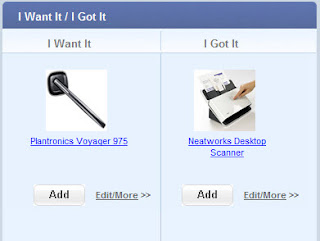 Here's a screenshot of a few items I've started on.
As you will learn, I'm a gadget freak. I like all cool, new gizmos that make life easier and more fun.
If you click on the image or the label, you will open a new browser window linked to the page of the item you featured, so a friend or family member could look it up if they wanted to buy it for you or purchase it for themselves if they saw you had it and thought it could be useful.
You simply save an image on your desktop of the item you'd like to share. The closer you get to 125 X 125 pixels in size, the better. Save it in either .jpg or .png format. Then copy and paste the URL (or web page address) into the URL field. Lastly, enter some text to tell people about the item you are spotlighting.
When you save it, it appears in the proper column of "I Want It/I Got It."
You can make changes if you find that your image is not displaying the way you want it to by clicking the edit/more link. You can also move an item from "I Want It" to the "I Got It" sections by clicking the Move button on the Edit screen of the "I Want It" section. (See below.)
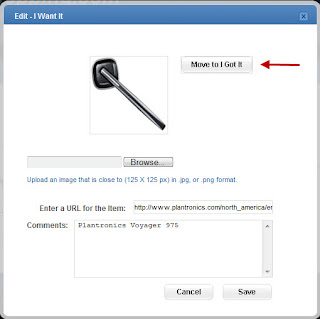
Have fun with this new tool and as always, let us know if you have suggestions or other ideas!
-virtualEmark
Once you register on our site, you are taken to your own personal profile page. Among other features that we will highlight over the next few weeks, you'll see on the right hand side of the page, the I Want It/I Got It feature.
Here's a screenshot of a few items I've started on.As you will learn, I'm a gadget freak. I like all cool, new gizmos that make life easier and more fun.
If you click on the image or the label, you will open a new browser window linked to the page of the item you featured, so a friend or family member could look it up if they wanted to buy it for you or purchase it for themselves if they saw you had it and thought it could be useful.

Here's a screenshot of how you add new items.
You simply save an image on your desktop of the item you'd like to share. The closer you get to 125 X 125 pixels in size, the better. Save it in either .jpg or .png format. Then copy and paste the URL (or web page address) into the URL field. Lastly, enter some text to tell people about the item you are spotlighting.
When you save it, it appears in the proper column of "I Want It/I Got It."
You can make changes if you find that your image is not displaying the way you want it to by clicking the edit/more link. You can also move an item from "I Want It" to the "I Got It" sections by clicking the Move button on the Edit screen of the "I Want It" section. (See below.)
Have fun with this new tool and as always, let us know if you have suggestions or other ideas!
-virtualEmark
Monday, August 17, 2009
Preparing furiously for a second launch...
Greetings all,
In launching this weblog, we are deeply in the throes of preparations for a second launch of virtualEshopping.com. After an initial launch in the fall of 2009, we gathered feedback from all quarters and have implemented numerous enhancements - in the 3D and 2D realms.
Details to follow soon, but we can sum it up with the title of our new, redesigned homepage:
"Social Networking, Meet 3D Shopping."
In launching this weblog, we are deeply in the throes of preparations for a second launch of virtualEshopping.com. After an initial launch in the fall of 2009, we gathered feedback from all quarters and have implemented numerous enhancements - in the 3D and 2D realms.
Details to follow soon, but we can sum it up with the title of our new, redesigned homepage:
"Social Networking, Meet 3D Shopping."
Subscribe to:
Posts (Atom)
